Overview
Using the API, experienced users can connect the calendar to other systems, such as Make.com (Integromat).
This feature is available in the Premium version
API Key
You can create and manage API keys in the admin settings under API. The API key must be included as a header in every request:
X-API-KEY: {{YOUR_API_KEY}}
Retrieve Appointments
Retrieve a list of all appointments within a specific time period:
curl --location --request GET 'https://api.calendar.online/public/event?startDate=2021-01-01&endDate=2025-01-01&timeZone=Europe/Berlin&query=' \
--header 'X-API-KEY: {{YOUR_API_KEY}}'
Retrieve a single event
curl --location --request GET 'https://api.calendar.online/public/event/{{EVENT_ID}}?timeZone=Europe/Berlin' \
--header 'X-API-KEY: {{YOUR_API_KEY}}'
Create appointment
curl --location --request POST 'https://api.calendar.online/public/event' \
--header 'X-API-KEY: {{YOUR_API_KEY}}' \
--header 'Content-Type: application/json' \
--data-raw '{
    "startDate": "2025-07-01 12:00:00",
    "endDate": "2025-07-01 13:00:00",
    "timeZone": "Europe/Berlin",
    "title": "API Test",
    "subCalendars": [{{SUBCALENDAR_ID/SUBCALENDAR_NAME}}],
    "description": "",
    "who": "",
    "where": "",
    "wholeDay": false,
    "links": []
}'
Change Event
curl --location --request PUT 'https://api.calendar.online/public/event/{{EVENT_ID}}' \
--header 'X-API-KEY: {{YOUR_API_KEY}}' \
--header 'Content-Type: application/json' \
--data-raw '{
    "startDate": "2025-07-01 13:00:00",
    "endDate": "2025-07-01 14:00:00",
    "timeZone": "Europe/Berlin",
    "title": "API Test",
    "subCalendars": [{{SUBCALENDAR_ID/SUBCALENDAR_NAME}}],
    "description": "",
    "who": "",
    "where": "",
    "wholeDay": false,
    "links": []
}'
Delete Event
curl --location --request DELETE 'https://api.calendar.online/public/event/{{EVENT_ID}}' \
--header 'X-API-KEY: {{YOUR_API_KEY}}'
Create subcalendar
curl --location --request POST 'https://api.calendar.online/public/subcalendar' \
--header 'X-API-KEY: {{YOUR_API_KEY}}' \
--header 'Content-Type: application/json' \
--data-raw '{
    "name": "API Test"
}'
Edit subcalendar
curl --location --request POST 'https://api.calendar.online/public/subcalendar/{{SUBCALENDAR_ID}}' \
--header 'X-API-KEY: {{YOUR_API_KEY}}' \
--header 'Content-Type: application/json' \
--data-raw '{
    "name": "API Test"
}'
Delete subcalendar
curl --location --request DELETE 'https://api.calendar.online/public/subcalendar/{{SUBCALENDAR_ID}}' \
--header 'X-API-KEY: {{YOUR_API_KEY}}'
Webhooks
Webhooks allow you to set up automatic notifications and integrations with other systems. The following events can be triggered:
Appointment created
Appointment modified
Appointment deleted
Set up a webhook
Go to the API under API Keys and click the Webhooks button. Click + New Webhook and enter the relevant data.
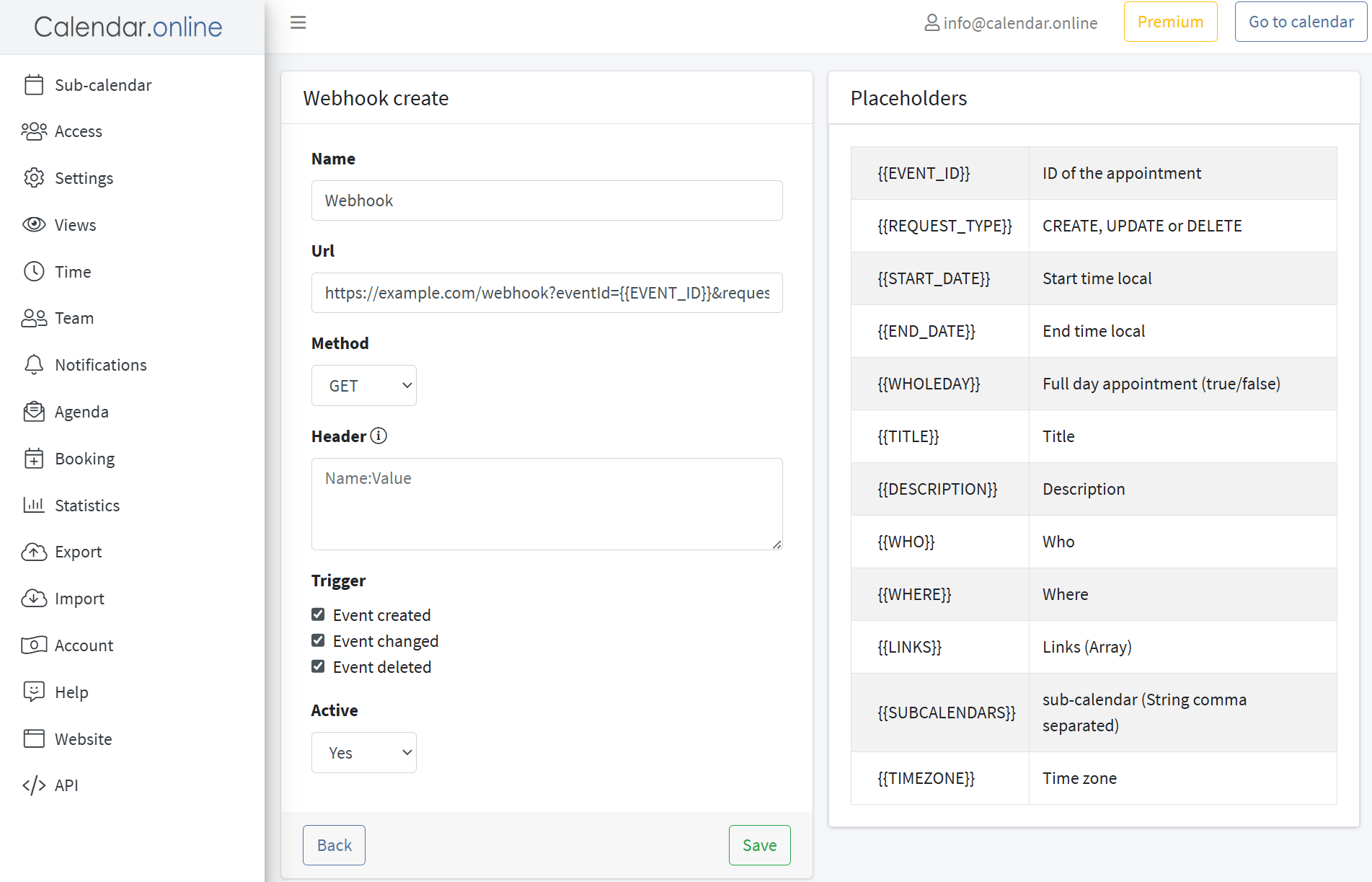
Placeholder for webhooks:
{{EVENT_ID}} Appointment ID
{{REQUEST_TYPE}} CREATE, UPDATE, or DELETE
{{START_DATE}} Start time (local)
{{END_DATE}} End time (local)
{{WHOLEDAY}} All-day event (true/false)
{{TITLE}} Title
{{DESCRIPTION}} Description
{{WHO}} Who
{{WHERE}} Where
{{LINKS}} Links (array)
{{SUBCALENDARS}} Subcalendars (comma-separated string)
{{TIMEZONE}} Time zone